

Contracts and e-signature
Write the contract and get it signed in the same place
Draft from your templates and clauses, fill in client details from the record, then send it for signature without a separate e-sign tool. The signed PDF and audit certificate stay on the contract.
Included on every plan, including Free; contract approvals start on Team.
Contracts › Statement of work: Brand refresh
Statement of work: Brand refresh
PublishedExecutedCTR-0318 · Harbor & Pine Coffee · Owned by Priya Shah
Contract value
$24,000.00
Effective
Nov 2, 2026
Expires
Apr 30, 2027
Versions
2
Signers
1 of 2 signed2 of 2 signedPriya Shah
Fernhill Studio · Signer
Oct 23, 4:16 PM
Maya Chen
Harbor & Pine Coffee · Signer
Oct 24, 10:38 AMOct 24, 10:42 AM
Document previewSigned PDF · page 4 of 4
Statement of work
Signing certificate
SparkDesk e-signature is a convenience record, not a certified or qualified electronic signature service.
Document
Title: Statement of work: Brand refresh
Packet ID: PKT-7F3A21 · Completed: Oct 24, 2026, 10:42 AM
Signed document SHA-256: 4d81ac06f5e2...
Signers
Maya Chen <maya@harborpine.example> · Signed · IP 203.0.113.24
Priya Shah <priya@fernhill.example> · Signed
Event timeline
Oct 23, 4:15 PM | Sent for signature | Priya Shah
Oct 23, 4:16 PM | Signed | Priya Shah
Oct 24, 10:38 AM | Viewed the document | Maya Chen
Oct 24, 10:39 AM | Accepted electronic records consent | Maya Chen
Oct 24, 10:42 AM | Signed | Maya Chen
Signature request
Statement of work: Brand refresh
Review and complete your signature request.
Maya Chen · Due Oct 31, 2026
Required fields
ReviewingIn progressReady0 of 1 completed1 of 1 completed
Choose your signature
Signature name
Draw your signature
ClearSignature request completed
DocumentStatement of work: Brand refresh
SignerMaya Chen
PacketPKT-7F3A21
Signature request completed
Your responses were saved successfully.
- The client opens the signature request for "Statement of work: Brand refresh" on their phone and accepts the electronic records consent.
- They draw their signature with a finger and adopt it for the signature field.
- They complete signing, and the request shows as completed with a signed copy to download.
- On the desktop, the contract changes to Executed, both signers show as signed, and the signing certificate is added to the signed PDF with times and the signer's IP address.
The problem
Sound familiar?
- We pay for a separate e-sign tool just to get our standard agreement signed.
- Someone always edits an old version of the contract.
- I have to dig through email to show when the client actually signed.
How it works
From draft to signed
1
Start from a template
Contract templates with tag placeholders pull the client, project and amounts from the record. Insert approved clauses from your library.
2
Review the versions
Each change is saved as a version. Compare two versions side by side before you publish.
3
Set up signing
Assign people to signing roles, set the signing order and a sign-by date, then send by email or share each signer's private link yourself.
4
Keep the record
When every signer is done, the signing certificate is added to the signed PDF, and it stays attached to the contract.
In the app
The real screen
Captured from a demo workspace, not a mock-up.
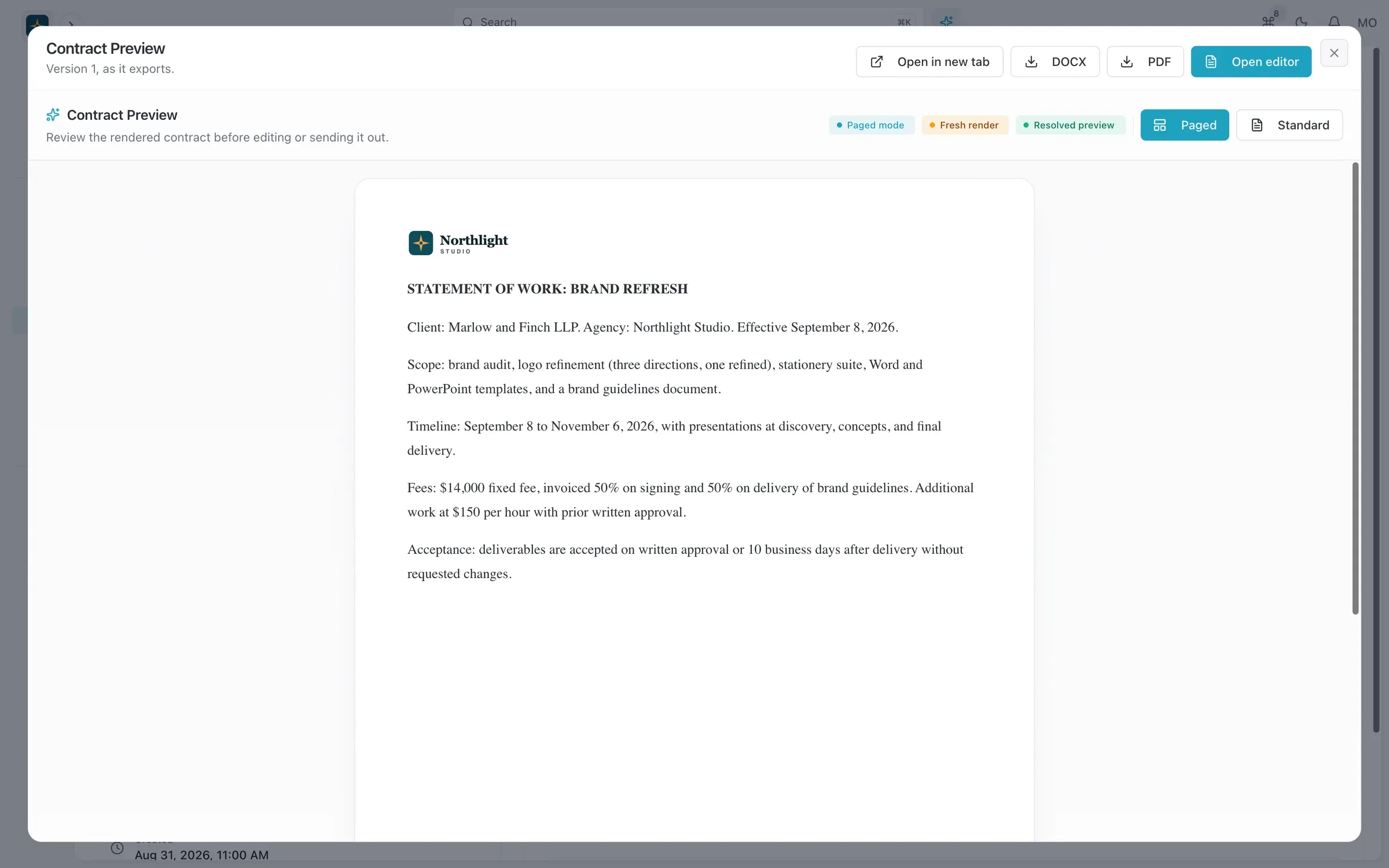
- Your letterhead and logo
- Export to PDF or DOCX
- Version and status
What you get
- Clause library
- Save the clauses you reuse, such as payment terms or ownership of work, and drop them into any contract.
- Version history with a diff
- See exactly what changed between versions, so nobody signs a draft by mistake.
- Signing order and deadlines
- Signers go in the order you set, and signing links expire at the sign-by date you choose.
- Type or draw a signature
- Signers type or draw their signature and confirm their consent, which is recorded with timestamps on the signing certificate.
- Reminders and signing links
- Signers get reminders, and you can copy a signing link or open the signing page to sign in person.
- DocuSign or PandaDoc
- If a client expects a dedicated e-sign service, send the same contract through DocuSign or PandaDoc instead.
- Your branding
- Branding profiles set the logo, header, footer and styles, and the signing page shows your logo, so contracts look like they came from your studio.
- Export to PDF or Word
- Export any contract as a PDF or DOCX file for your lawyer or the client's procurement team.
- Linked to the deal
- Contracts sit on the account and opportunity, next to the quote and the project they cover.
Read the documentation
Works with
Quotes and invoicing
Quotes that become deposit, progress and final invoices, invoicing from hours, online payments and automatic reminders.
Learn moreCRM
Accounts, contacts, leads and a deal pipeline that carry straight into quotes, projects and invoices.
Learn moreClient portal
A portal where clients sign in with an email link to see invoices, documents, projects and requests.
Learn more
Used by: consultancies, creative studios, event planners
Compare: vs Productive, vs HubSpot, vs monday.com, vs Notion
Contracts and e-signature: questions
Something else? Ask us.
Do I still need a separate e-signature tool?
No. E-signature is built in. You choose the signers, signing order and sign-by date, signers type or draw their signature, and SparkDesk adds a signing certificate to the signed PDF. If a client prefers DocuSign or PandaDoc, you can send through those instead.
How do clients sign?
Signers get their request by email, or you share their private signing link yourself. They sign the stored PDF of the contract version you published, on a page that shows your logo.
Can I see what changed between drafts?
Yes. Every contract keeps a version history, and you can compare any two versions side by side.
Is an e-signature valid for my agreements?
SparkDesk keeps the signed PDF with a certificate that records consent and timestamps. It is not a certified e-signature service; for agreements that need one, send through DocuSign or PandaDoc. Check with your lawyer for anything unusual.
Run your next client project in SparkDesk.
Start a 14-day free trial of any paid plan. No card needed, and you can drop to the Free plan at any time.